













Skip to content
AI workflow automation

AI workflow automation that fits the tools you already run.

We connect email, ERP and internal tools so requests get read, routed and drafted by AI, with a person approving anything that matters.

AI workflow automation at a glance

What it is
Software that moves work between your systems, with AI on the steps that need judgment.
Best for
Teams with shared inboxes, repeat data entry or slow handoffs.
Connects to
Odoo, Microsoft 365 and other tools with an API.
Typical timeline
4 to 8 weeks for one focused automation.
Where we've done it
AI email ticketing for Regard Network Solution, a data center company in North India.
Is this for you?

An honest check before we talk.

A good fit if…

  • Requests land in shared inboxes with no owner.
  • Staff retype the same details into several systems.
  • Someone loses a day each week to one report.
  • You run Odoo, Microsoft 365 or another tool with an API.

Probably not for you if…

  • Nobody can say how the process runs today.
  • You want AI acting on customers with no review.
  • The task only happens twice a year.
  • It has to be live by next week.
The service

The repetitive work between your tools, handled with a person in the loop.

AI workflow automation is software that moves work between your systems and calls an AI model for the steps that need judgment, such as reading an email, classifying a request or drafting a reply. Fixed rules handle everything else.

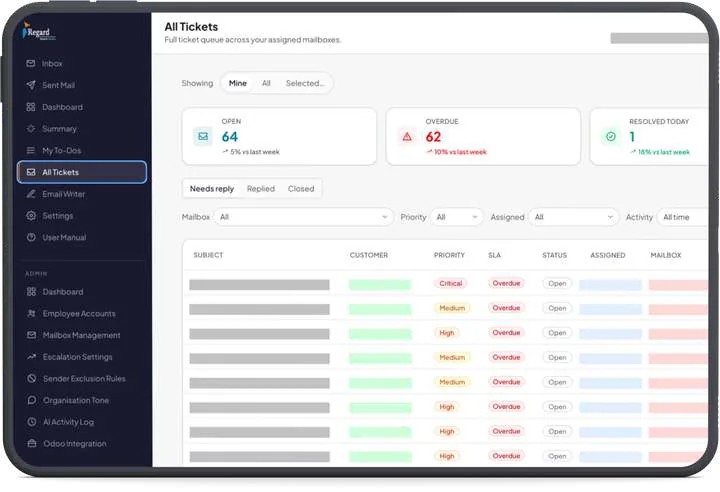
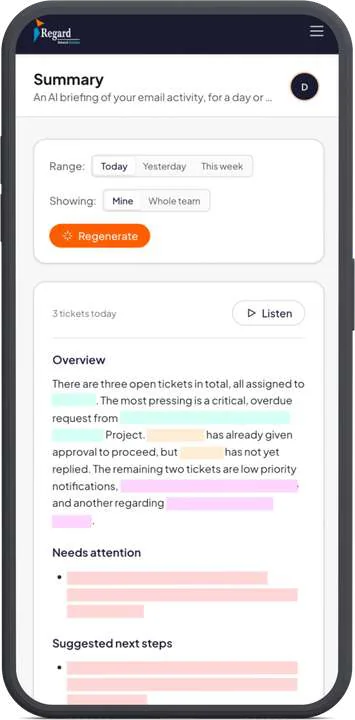
Our reference build is for a data center infrastructure company in North India. Incoming email becomes tracked tickets with a priority and an SLA. AI drafts replies in the company's own tone and writes a daily summary that staff can read or listen to. The system works with Odoo and Microsoft, and admins control escalation rules and excluded senders and can read a log of every AI action.

Email and ticketingOdoo and MicrosoftAI activity log
Ticket queue showing open, overdue and resolved counts with priority and SLA columns
Phone view of an AI-written daily email summary with needs attention and next steps
What you get

A working system you can run yourselves.

It lives in your accounts, with the documents your team needs to run it.

01Discovery

Workflow map

How the work moves today, where it stalls, and which steps need a person.

02Build

Connected systems

Your inbox, ERP and internal tools linked through their APIs, with scoped access.

03Build

AI steps with guardrails

Classification, drafting and summaries, with permissions, escalation rules and an activity log.

04Launch

Team handover

Training, a user manual and support while your team settles in.

Compare

Rules, no-code tools or custom AI?

Most workflows only need the simplest option that handles their exceptions. Here's how we choose.

ItemFixed rulesNo-code tools (n8n, Make)Custom build with AI
Best forPredictable steps with clean dataSimple flows between common appsMessy input, many exceptions, or several systems
Reads free textNoYes, with an AI step addedYes, with your own checks around it
Permissions and audit logBasicDepends on the tool and planDesigned around your roles and rules
Cost patternLowMonthly fee, often rising with volumeHigher up front, then hosting and AI usage
Choose it whenNobody needs to interpret anythingYou want it working this weekA mistake costs real money or trust
Engagement

One workflow first. Then the next.

We automate one process end to end and check it on real work before touching another. You get the scope and price in writing before we build.

2

Business systems connected in our reference build, Odoo and Microsoft.

1

Ticket queue across every shared mailbox, with priority and SLA on each.

Process

From your busiest inbox to a tracked queue.

We start with real emails and real tickets.
Your team reviews AI output before it goes anywhere.

Book a free call
  1. Understand

    We talk to the people who do the work, look at the tools they already use, and write down the one outcome this project has to deliver.

  2. Scope

    You get a written scope, a stack and a plan. Anything that launch doesn't need gets moved to a later phase, so the first release stays small enough to ship.

  3. Build

    We build in short cycles and put working software in front of you as we go, on real data wherever we safely can. You see progress in the product, not in a status deck.

  4. Launch and support

    We hand over with training and documentation, watch the first weeks closely, and stay available to fix and extend what we built.

Case studies

Where we've done this.

2

Business systems connected, Odoo and Microsoft

1

Ticket queue across shared mailboxes

Data center infrastructureNorth India

Enterprise email turned into a tracked, AI-assisted ticket queue.

Read story
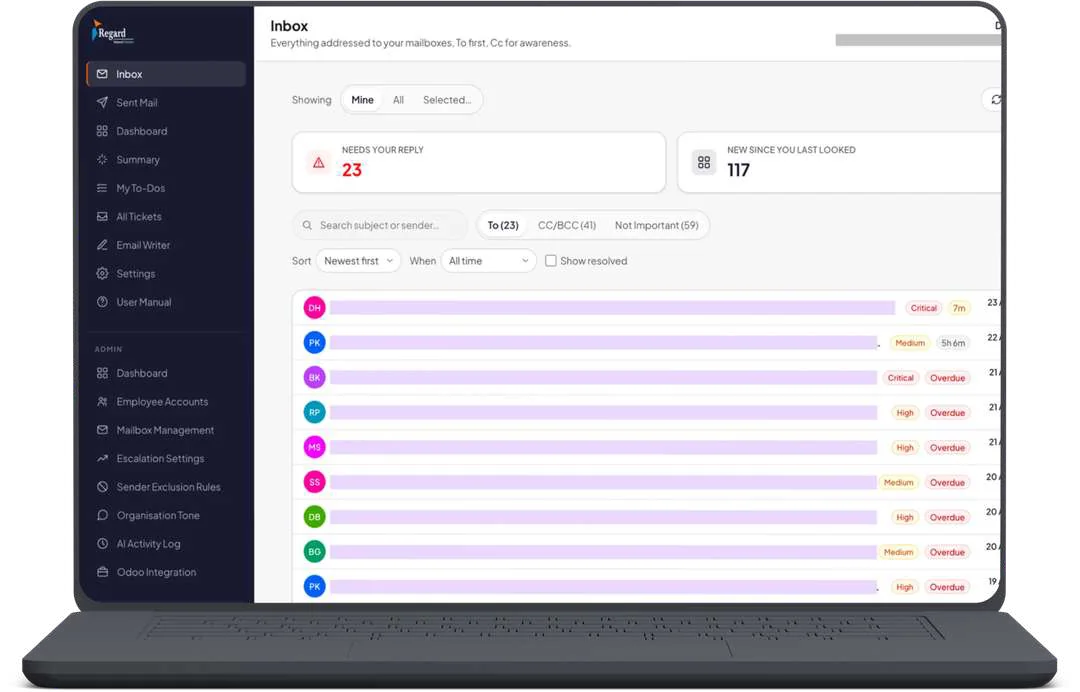
AI inbox on a laptop showing emails ranked by priority, with customer details masked
Phone view of an AI-written daily email summary with needs attention and next steps
Regard Network SolutionData center infrastructure, North India
7

Panels, from guest to management

1

Reinforcement learning model for offers

HospitalityGlobal

Our own hotel product, with an AI that upsells by context on WhatsApp.

Read story
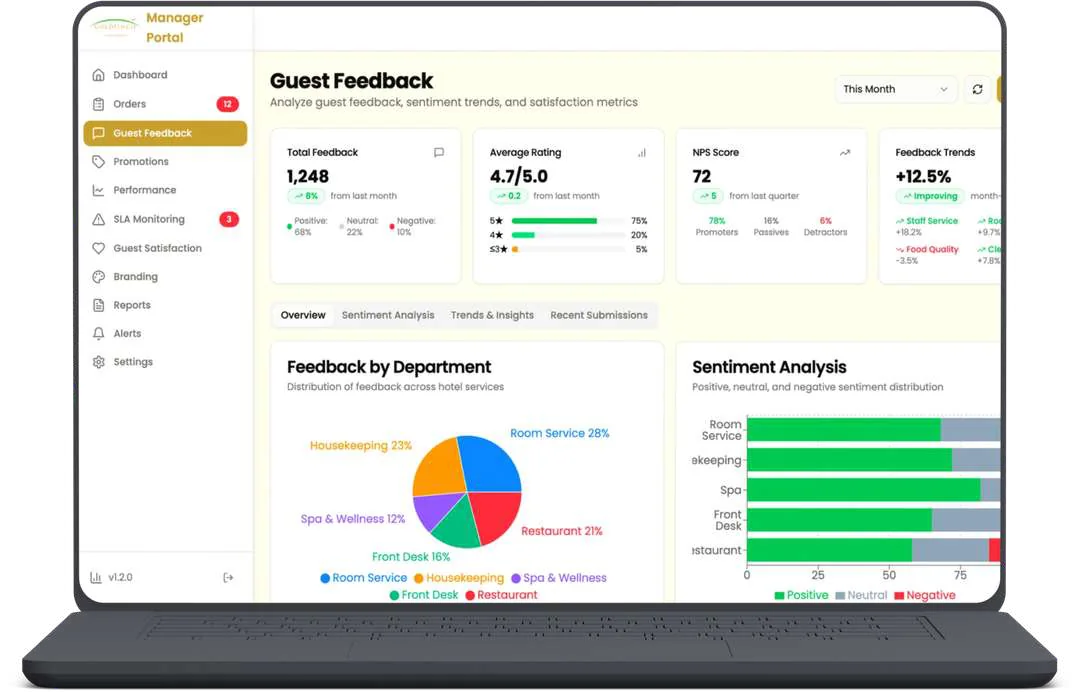
Hotel guest feedback dashboard with sentiment by department
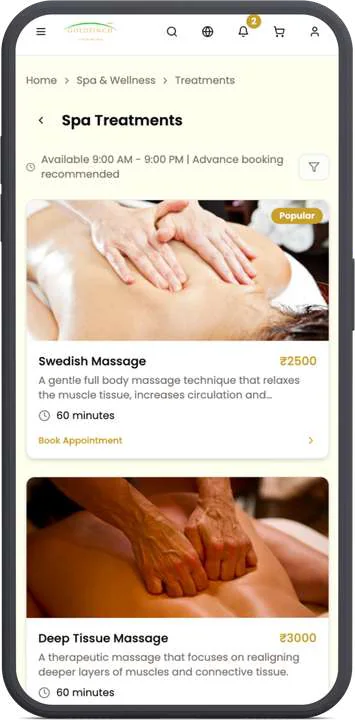
Guest-facing spa treatment menu on a phone
QuickgickOur own hospitality product

Related guides

AutomationOdoo

How to automate support email with AI on Odoo and Microsoft 365

Read guide

Tools we often use for this work

  • Python
  • Anthropic
  • OpenAI
  • Gemini
  • Odoo
  • Microsoft Graph
  • PostgreSQL
FAQ

Questions about AI workflow automation

Still have a question?

Ask us directly. You’ll talk to the people doing the work.

What is AI workflow automation?

It's software that carries work from one system to another and uses an AI model where a fixed rule can't decide, such as reading a customer email and working out what it asks for. Good ones keep a person on the steps where a mistake would cost something.

Can you connect AI to Odoo and Microsoft 365?

Yes, we've built this for a data center company. On the Microsoft side we limit the app to named mailboxes with RBAC for Applications, which is Microsoft's current replacement for Application Access Policies, and we remove the broad tenant-wide permission so the limit takes effect.

Should we use n8n or Make, or custom code?

Tools like n8n and Make suit simple flows with few exceptions, and we'll tell you if that's all you need. Custom code earns its cost when the workflow needs its own screens, detailed permissions, an audit trail, or enough volume that per-task pricing starts to hurt.

How do you stop the AI sending something wrong?

AI output waits for approval until your team trusts that category of work, and sensitive senders can be excluded altogether. We also treat every incoming email as untrusted, because it can contain instructions aimed at the model. OWASP lists this as LLM01:2025 Prompt Injection and recommends human approval for privileged actions, which is how we build.

Will our data be used to train AI models?

Anthropic's commercial terms and OpenAI's API documentation both say API data isn't used for training by default. We tell you which provider a project uses and check its current terms before any private data goes through it.

How long does an automation project take?

A focused automation usually takes 4 to 8 weeks. The timeline depends mostly on how clean the source systems are and how quickly someone on your side can answer questions.

Which workflow would you hand over first?

Send us the process your team dreads most. We'll tell you whether AI belongs in it and what the first version would look like.