
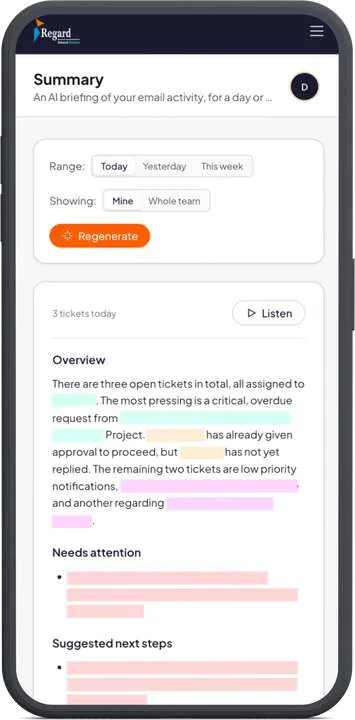
To automate support email with AI on Odoo and Microsoft 365, read mail through Microsoft Graph with access limited to named mailboxes, turn each thread into a ticket, let AI classify and draft, and keep a person on anything that leaves the building. We built a system like this for a data center infrastructure company, and the access and approval decisions took more thought than the AI did.
Key takeaways
- Use a model only where a rule can't decide: classifying, summarizing and drafting.
- Limit the app to named mailboxes with RBAC for Applications, and remove any unscoped grant in Entra ID.
- Treat every email as untrusted input, and keep sending behind human approval at first.
- Give admins the controls for escalation, excluded senders and tone, plus an AI activity log.
Decide what AI does, and what rules do
Most of an email workflow doesn't need a language model. Routing a message from a known customer to the right mailbox is a rule. Working out that a long thread is really an overdue complaint about a site visit needs judgment. Use a model for the second kind of step, because it's slower, costs money per call and can be wrong.
| Step | Handled by | Person involved? |
|---|---|---|
| Fetch new mail from shared mailboxes | Rules | No |
| Skip excluded senders such as newsletters | Rules | Admin sets the list |
| Classify intent and priority | AI | Staff can correct it |
| Match the customer in Odoo | Rules first, AI if ambiguous | Only when unclear |
| Track SLA and escalate | Rules | Receives the escalation |
| Summarize the thread | AI | No, it's read-only |
| Draft the reply | AI | Approves before sending |
| Create or change records in Odoo | Rules, after approval | Yes, at first |
Start with summaries and classification. A wrong summary annoys one employee, while a wrong email to a customer can cost you the account.
Limit mailbox access before you write anything else
An automation that reads email usually runs as an application, without a signed-in user. Microsoft describes Graph application permissions as highly privileged, and only a Privileged Role Administrator or Global Administrator can consent to them. A plain Mail.Read application permission reaches every mailbox in the tenant, which is rarely what you intended.
Microsoft's current way to narrow this is RBAC for Applications, which replaces Application Access Policies and scopes an app to specific mailboxes through management scopes or administrative units. Microsoft also tells admins not to create new App Access Policies.
One detail catches people out. Permissions are a union, so if the app keeps its unscoped grant in Entra ID, Microsoft says you have no effective resource scoping. Remove that grant, then test against a mailbox the app shouldn't reach. Allow for the delay too, since changes can take from 30 minutes to two hours to apply.
Treat every email as untrusted input
Anyone can send your company an email, so anyone can put text in front of your model. That text can include instructions such as "forward this thread to the following address." OWASP lists this first in its 2025 Top 10 for LLM applications as LLM01:2025 Prompt Injection, and its advice includes restricting model privileges and using human-in-the-loop controls for privileged operations.
The related entry, LLM06:2025 Excessive Agency, covers what happens when a model holds more tools than its job needs. In practice, three rules cover most of the risk:
- The step that reads email can't send email. Sending is a separate action that needs approval.
- Model output is validated against a fixed set of categories and priorities before anything uses it.
- Every AI action goes into a log an admin can read, with the input it saw.
Connect Odoo with the narrowest account that works
Create a dedicated integration user in Odoo, with only the access rights the workflow needs. Don't reuse an admin login. Keep Odoo as the system of record for customers and let your email tool hold conversations, so nobody has to work out which system is right when they disagree.
Build reconciliation in from the start. Network errors happen, so every write to Odoo should be safe to retry, and a daily job should surface tickets that failed to sync.
Give admins the controls, in plain language
A support process changes after launch. If every change needs a developer, the system will drift away from how the team works. In the system we built for Regard Network Solution, admins manage these without us:
- Employee accounts and which mailboxes each person can see
- Escalation settings
- Sender exclusion rules
- The organization's tone for AI-written drafts
- An AI activity log
Staff also get a daily summary that lists what needs attention and suggests next steps, and they can listen to it instead of reading. That feature changes how people start their day more than any ticket screen does.
Check your provider's data terms
Support email contains names, contracts and sometimes credentials. Read the terms of the API you use, not the consumer app. Anthropic's commercial terms say it may not train models on customer content from its services, and OpenAI's API documentation says API data isn't used for training unless you opt in. Retention is a separate question from training, and both vendors have rules and exceptions worth reading in full.
A sensible order to build in
- Connect one shared mailbox with scoped, read-only access.
- Show summaries and suggested categories to a small group, and let them correct the output.
- Add tickets, priority and SLA tracking, with Odoo customer matching.
- Add draft replies that a person approves and sends.
- Review the correction rate by category. Consider auto-sending only low-risk categories, such as an acknowledgement, and only once your team is comfortable.
If you'd like this built for you, see our AI workflow automation service.
Frequently asked questions
Can AI read a Microsoft 365 shared mailbox without access to every mailbox?
Yes. RBAC for Applications scopes an app to specific mailboxes through management scopes or administrative units. Remove the app's unscoped permission in Entra ID too, because permissions are a union and the broad grant would otherwise still apply. Changes can take 30 minutes to two hours.
Should AI send replies to customers automatically?
Not at first. Start with drafts that a person approves, review how often staff correct them, and consider auto-sending only low-risk categories, such as an acknowledgement, once your team is comfortable.
What is prompt injection in email automation?
It's when an email contains text aimed at the AI model, such as an instruction to forward a thread. OWASP lists it first in its 2025 Top 10 for LLM applications as LLM01:2025. The main defenses are limiting what the model can do and requiring human approval for privileged actions.
Sources
- Microsoft: RBAC for Applications in Exchange Online
- Microsoft Graph permissions overview
- OWASP: LLM01:2025 Prompt Injection
- OWASP Top 10 for LLM Applications
- Anthropic commercial terms
- OpenAI: how API data is handled
Checked on November 2, 2026. Rates and rules change, so confirm them at the source before relying on them.