Skip to content
A Brevity product

Every email answered. On time.

The AI inbox for teams that run on email. It reads, sorts and drafts every reply on your Microsoft 365 mailboxes, so your people only review and send.

  • Works on your Microsoft 365 mailboxes
  • Review before send, on every reply
  • Live in days, not months

Live in production: 31 mailboxes, 31,000+ emails

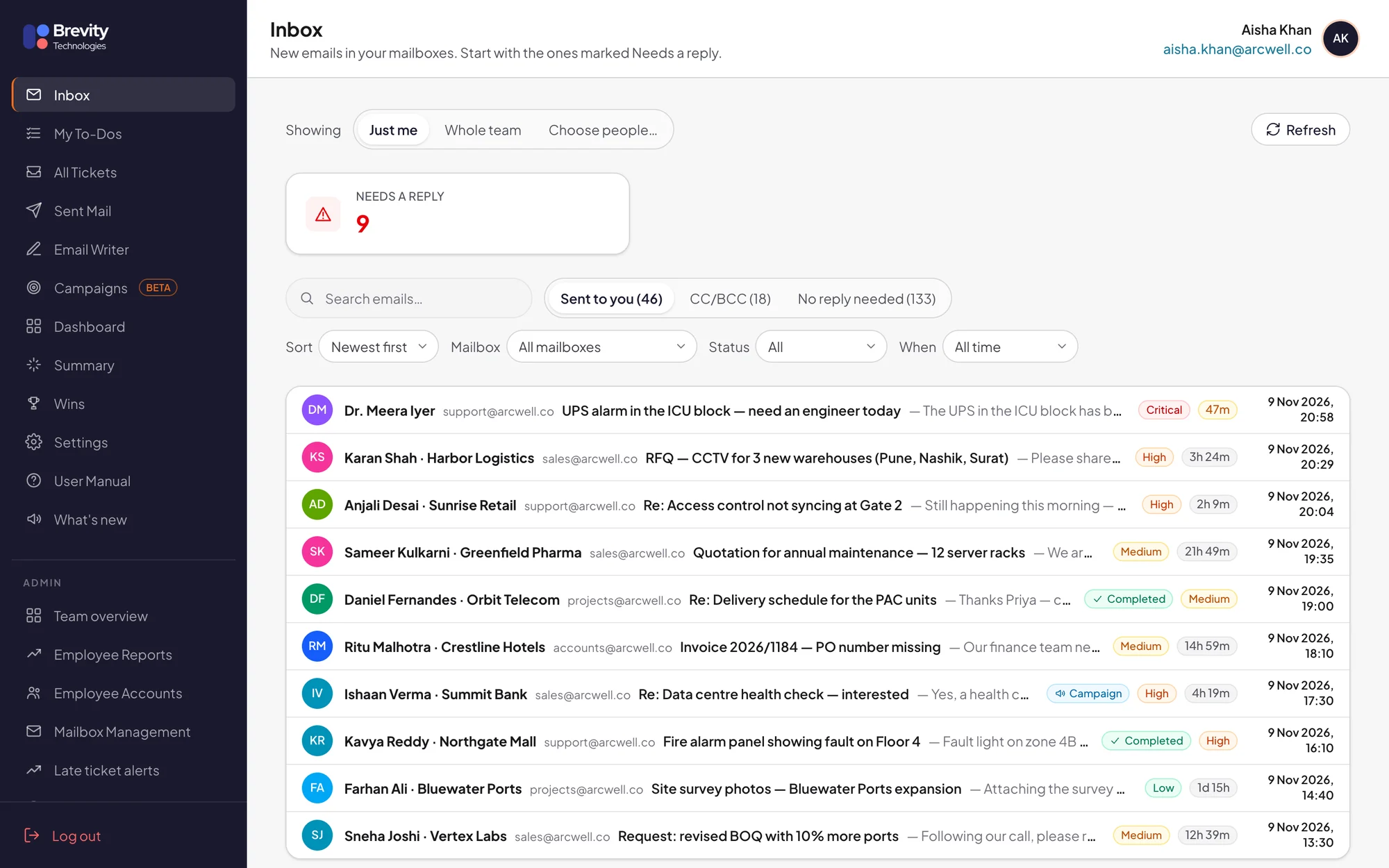
Brevity Mail AI inbox with nine emails needing a reply, each with a priority and time left

Screens show sample data from a demo company.

Live in production

Running every day at an enterprise IT company in India.

Its sales, helpdesk, HR and accounts mailboxes, and its team's own inboxes, all run on Brevity Mail AI.

See it on your inbox

31

mailboxes connected and live

31,000+

emails handled since August 2026

76%

filed automatically as needing no reply

1,700+

vendor commitments picked up

Brevity Mail AI at a glance

What it is
An AI inbox for teams that run on email. It reads, sorts and drafts every reply, so your people only review and send.
Works with
Your existing Microsoft 365 mailboxes, through Microsoft's official API. Your team keeps using Outlook, and Odoo helpdesk tickets can open and close automatically.
Best for
Teams that answer customers, vendors and colleagues from shared mailboxes such as sales, support, HR and accounts.
What the AI does
Files emails that need no reply, turns the rest into tickets with an owner, priority and deadline, drafts replies and tracks vendor promises.
What people do
Review and send. Nothing goes out until a person presses Send, except optional instant acknowledgements in your working hours.
In production
Running every day at an enterprise IT company in India: 31 mailboxes and 31,000+ emails since August 2026.
Setup
Live in days: connect your mailboxes, set owners and rules, and go live, with Brevity tuning it on your real mail.
The problem with shared inboxes

Shared mailboxes quietly lose customers.

Buried

Real requests sink under newsletters, alerts, CC copies and cold pitches.

Unowned

Everyone can see the email, so nobody is sure it's theirs to answer.

Invisible

Managers learn a reply was late when the customer complains.

What it does

Your team's inbox, run by AI.

It works on top of the Microsoft 365 mailboxes you already use. Every email is read, sorted and turned into a ticket with an owner, a priority and a deadline, and AI drafts the reply.

Smart inbox

Only the emails that need you.

AI reads every incoming email and decides whether a person needs to answer it. Newsletters, cold pitches, LinkedIn and job-portal alerts, bank notices and CC copies are filed away for you. Nothing is deleted.

  • Sent to you, CC and No reply needed, in separate tabs
  • The same inbox on your phone

76%

of the 31,000+ emails handled in production needed no reply, and were filed automatically.
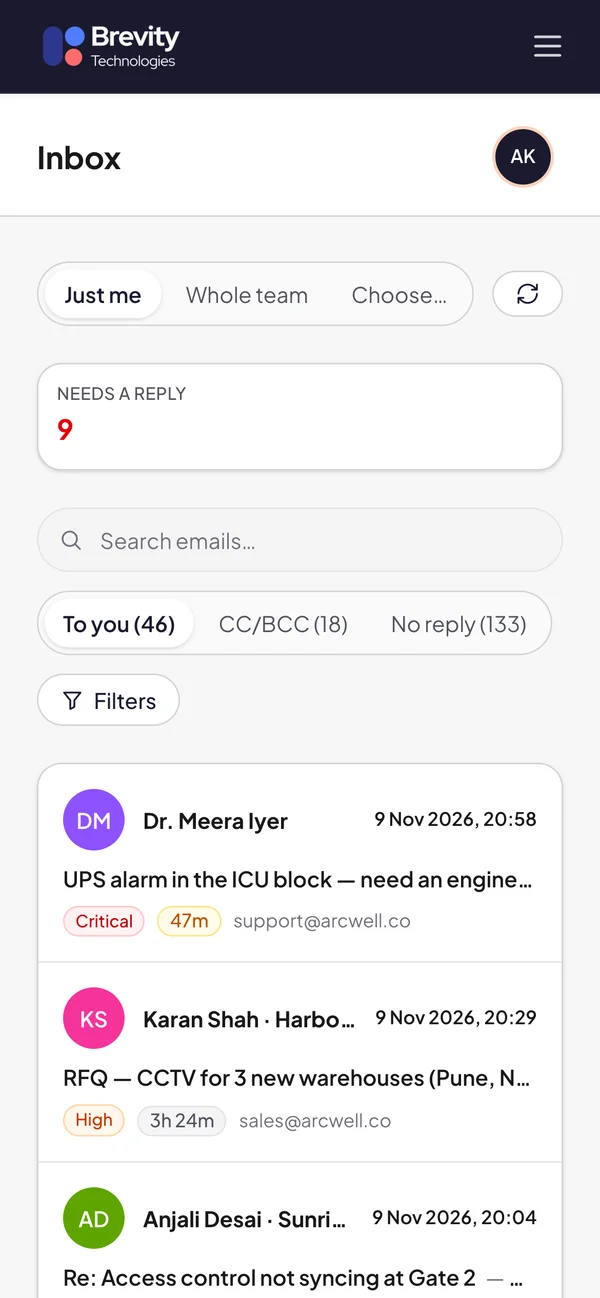
Brevity Mail AI inbox on a phone, split into To you, CC and No reply tabs
AI replies

AI writes the reply. You stay in charge.

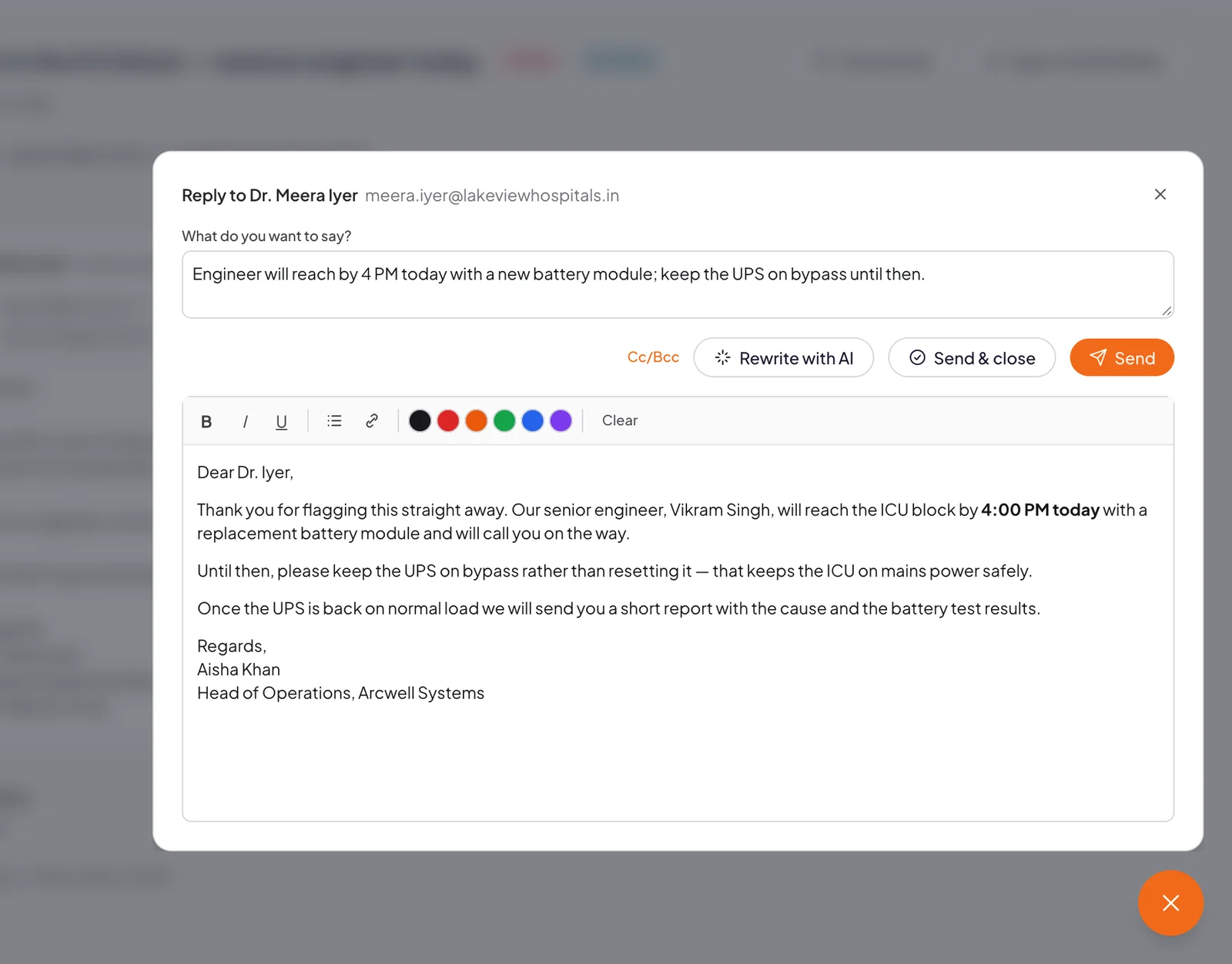
Type one line about what to say. The AI reads the whole conversation and drafts a complete reply in your tone, with your signature. Nothing goes out until a person presses Send.

  • Rewrite with AI until it sounds right
  • Send and close the ticket in one step
  • Optional instant acknowledgements, only in your hours
AI reply editor: one line about what to say, and a full drafted reply ready to review and send
Owners and deadlines

Every email gets an owner and a deadline.

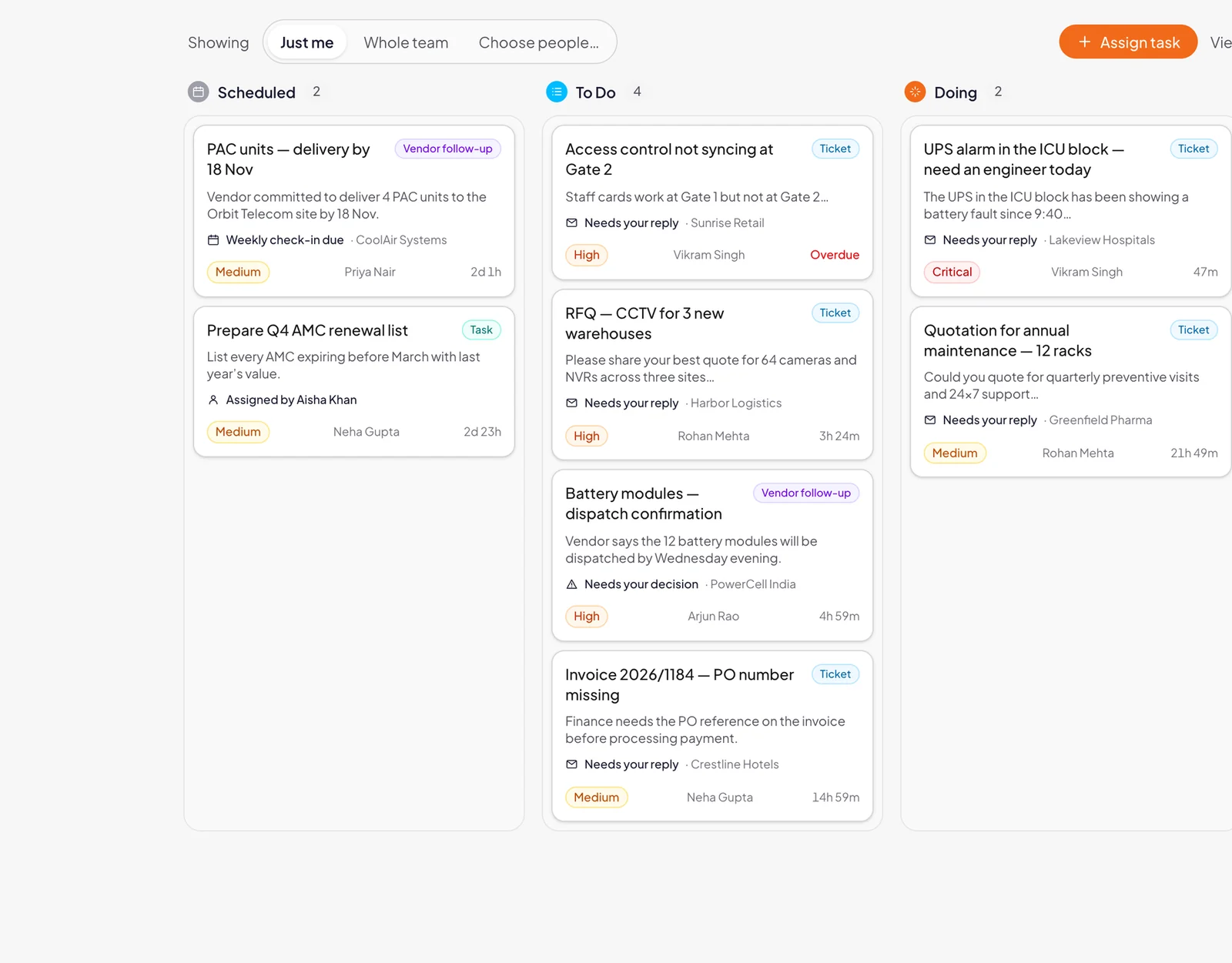
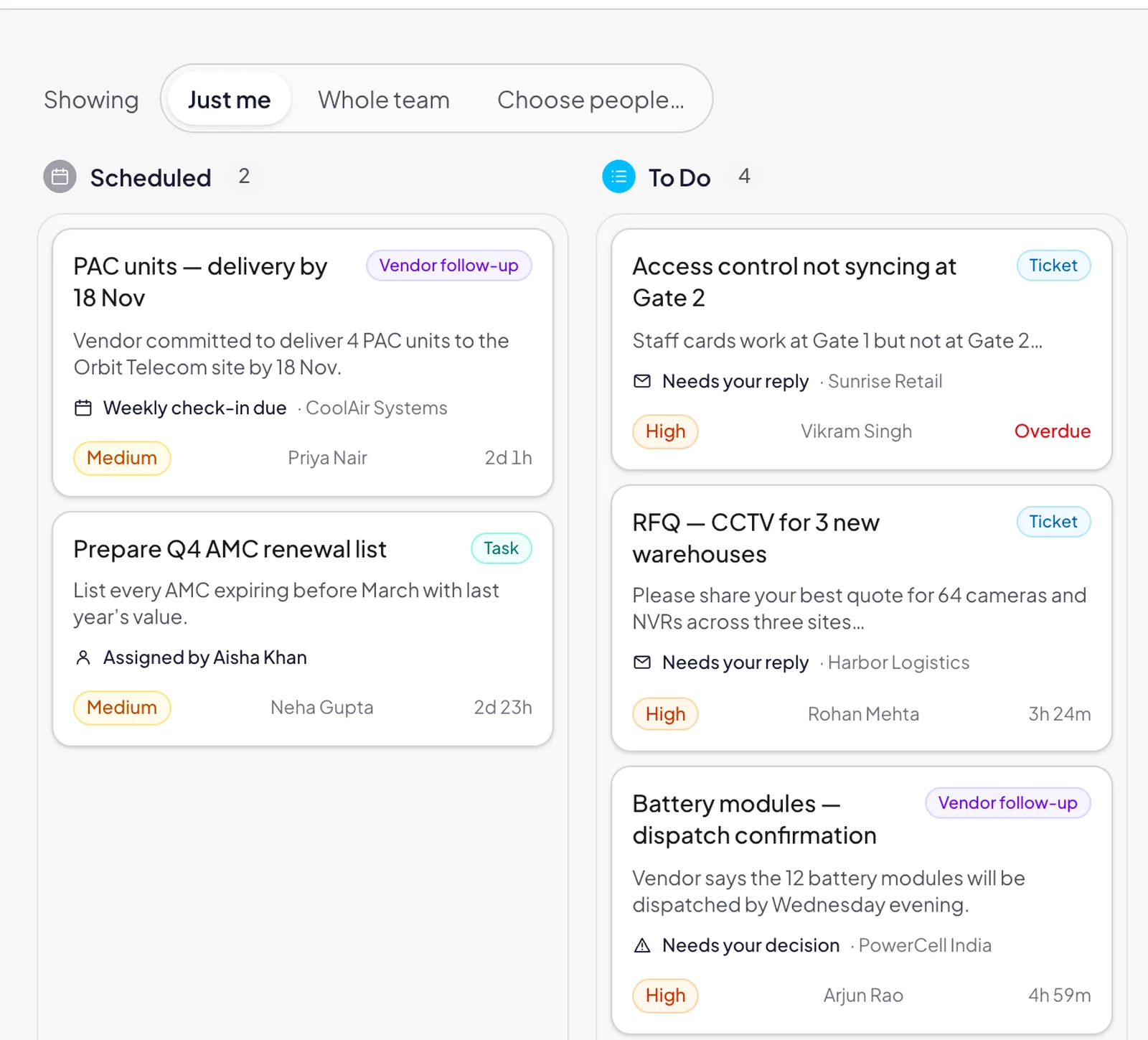
Each email becomes a ticket for the person who owns that mailbox. Its priority sets the deadline, and My To-Dos puts everything one person has to do on a single board.

  • Tickets, vendor follow-ups and tasks together
  • Phone alerts for new and late work
  • Replies sent from Outlook are picked up too
My To-Dos board with tickets, vendor follow-ups and tasks in Scheduled, To Do and Doing columns
Late-ticket alerts

Nothing slips past its deadline.

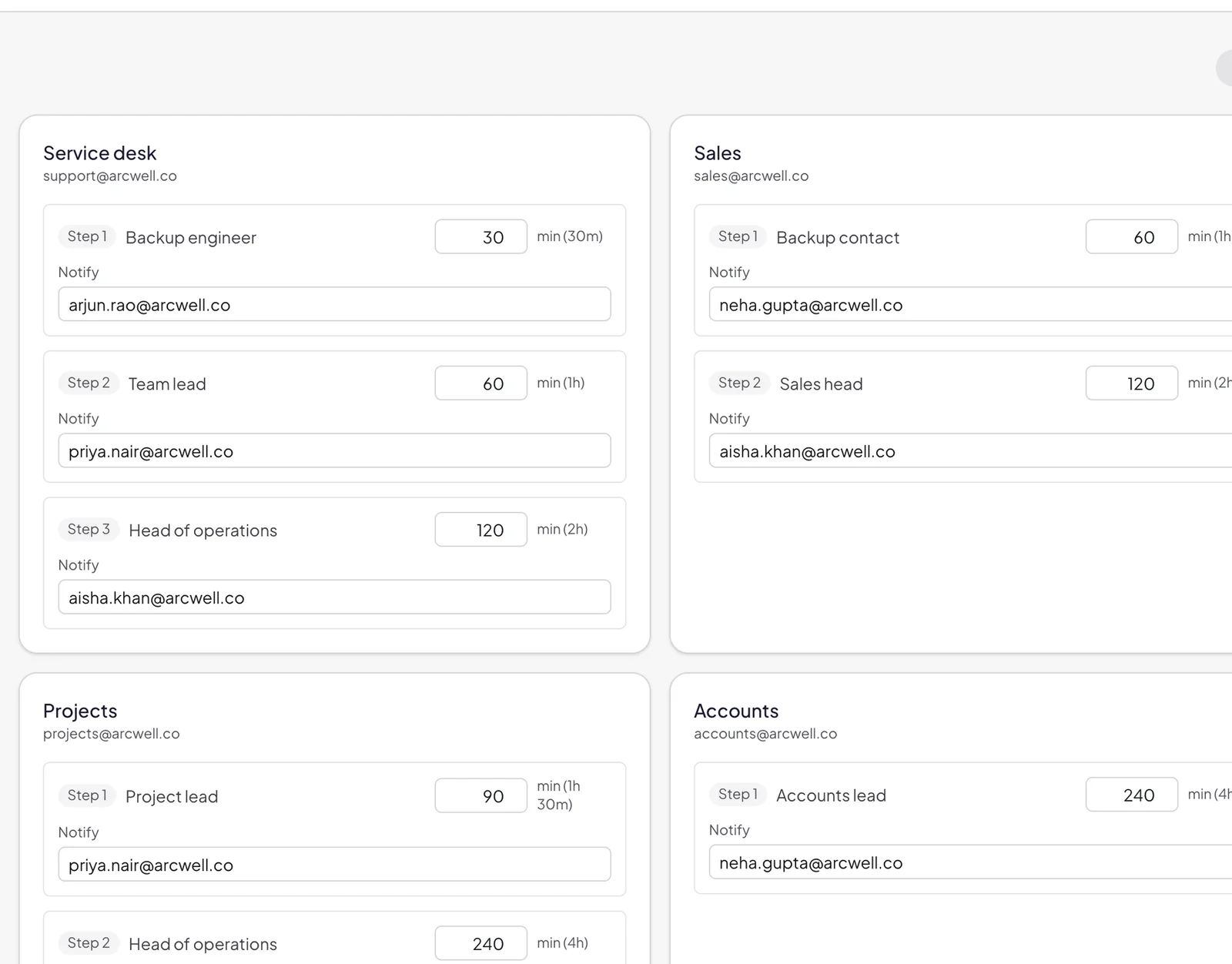
If nobody replies in time, the ticket climbs a chain you set for each mailbox, with a phone alert at every step.

  1. +30 minBackup engineer is alerted
  2. +1 hrThen the team lead
  3. +2 hrThen the head of operations
Late ticket alert settings with a backup engineer, team lead and head of operations for each mailbox
Email Writer

A complete email from one sentence.

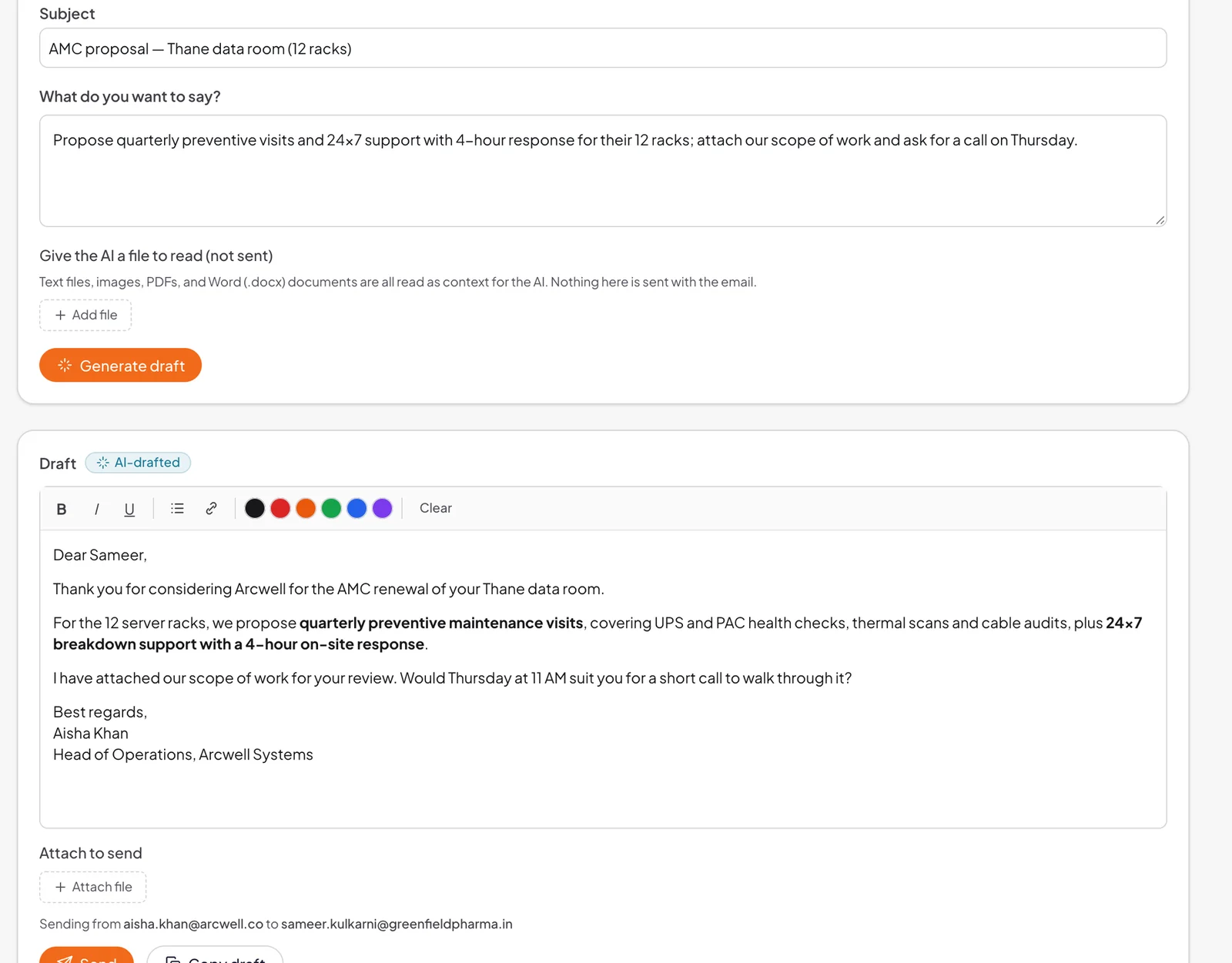
Describe what you want to say, hand the AI a PDF, Word file or image to read for context, and get a polished draft from the right mailbox.

  • Files it reads for context are never sent
  • Send from any mailbox you're allowed to use
  • Edit freely, then send or copy it into Outlook
Email Writer turning a one-line request into a complete AI-drafted email
Vendor follow-ups

Vendor promises, tracked for you.

When a supplier commits to a date in an email (“dispatch by Wednesday”), Brevity Mail AI spots it and puts it on the board. Confirm it, and a weekly check-in is drafted for you until it's delivered.

  • Confirm or decline each promise in one tap
  • Check-ins are reviewed before they're sent

1,700+

vendor commitments picked up in production.

Vendor follow-up cards showing supplier promises such as a delivery date, with weekly check-ins
CampaignsBeta

Outreach that stops when they reply.

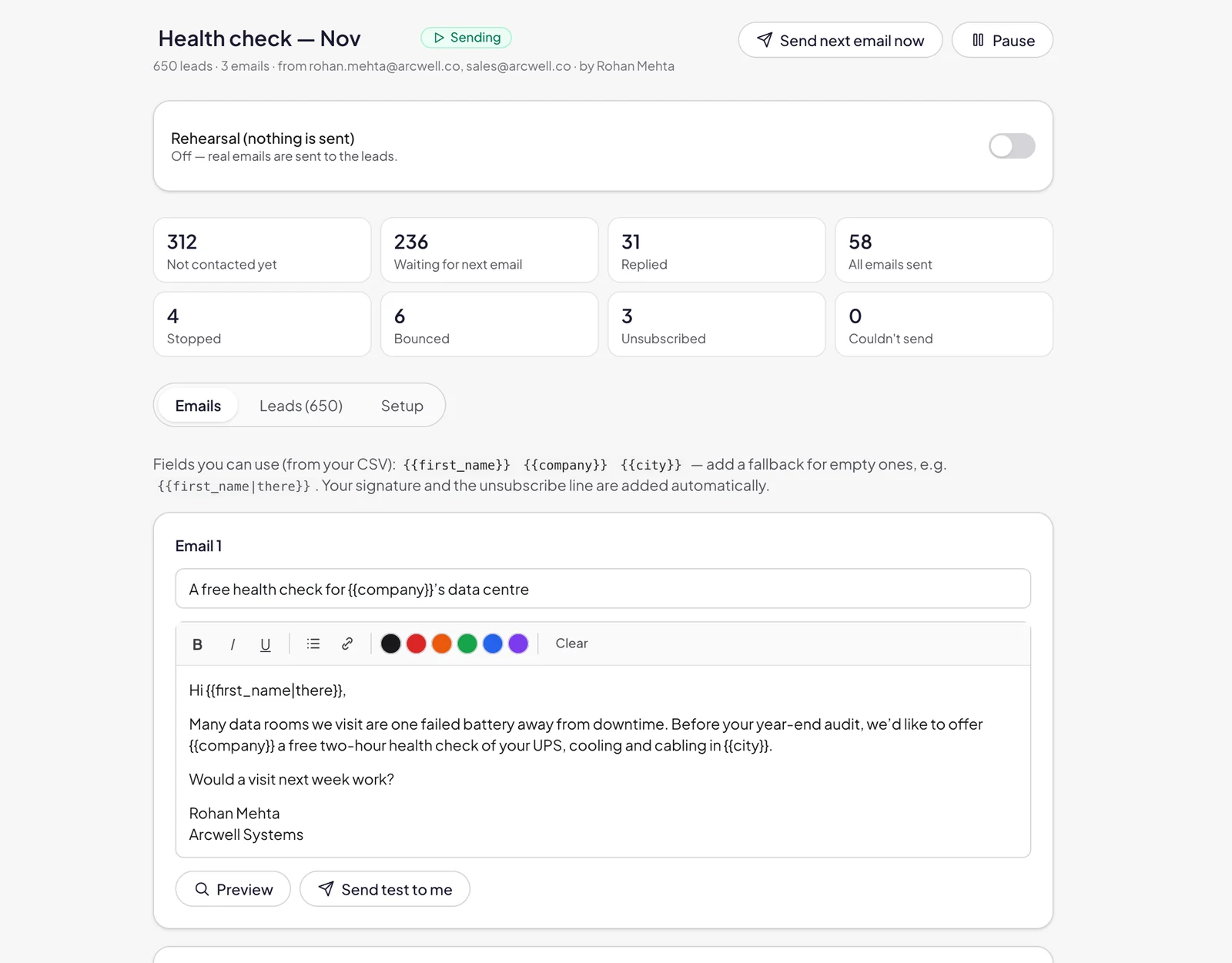
Send a short series of emails from your own mailboxes. Follow-ups go out as replies in the same thread, and stop the moment someone answers.

  • One reply can stop everyone at that company
  • Sending hours, daily limits and an unsubscribe line
  • Rehearsal mode: try it before anything is sent

Want us to run outbound for you instead? See Brevity Managed Outbound.

Campaign screen with leads contacted, replies, bounces and a rehearsal mode switch
Team visibility

See the whole team at a glance.

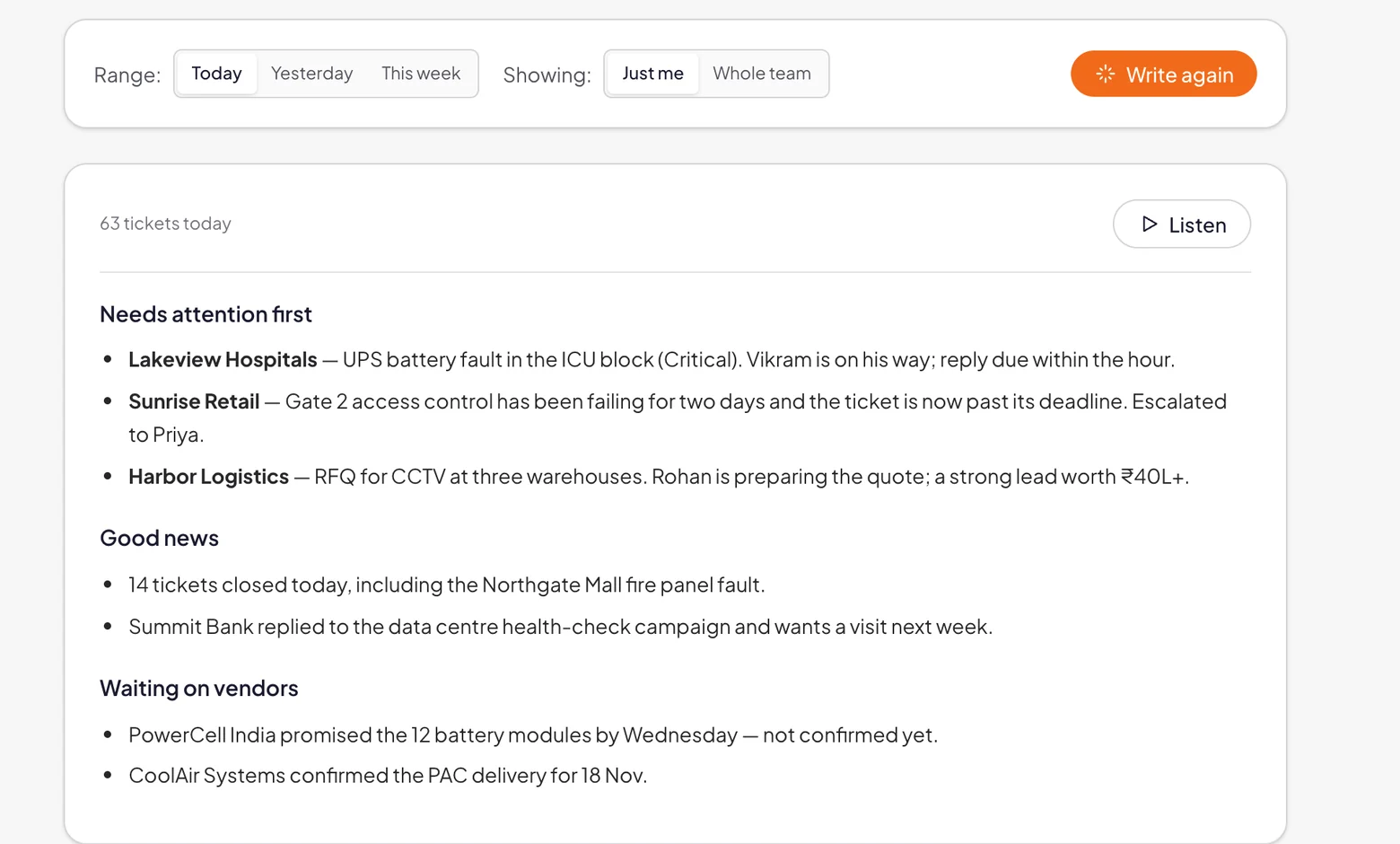
A live team overview, reports for each person, and an AI briefing of the day that you can read or listen to.

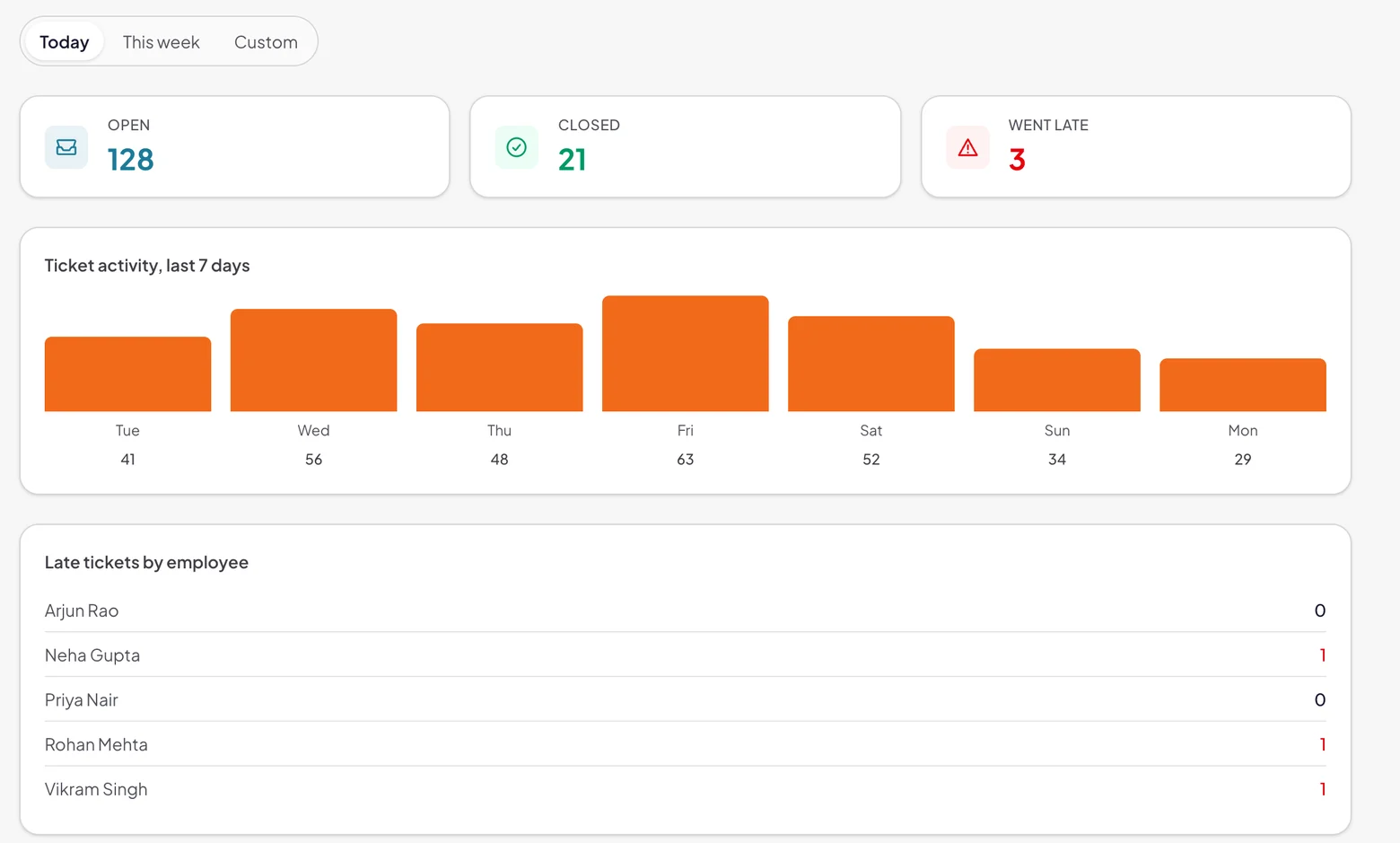
  • Open, closed and late tickets across every mailbox
  • Late tickets by person, and a breakdown by mailbox
  • An AI briefing you can read or listen to
Team overview with open, closed and late tickets and a chart of ticket activity for the last 7 days
Team overviewOpen, closed and late tickets, with activity for the last 7 days
AI daily briefing listing what needs attention first, good news and what is waiting on vendors
AI daily briefingWhat needs attention first, good news and what's waiting on vendors
AI controls

AI you can see, steer and pause.

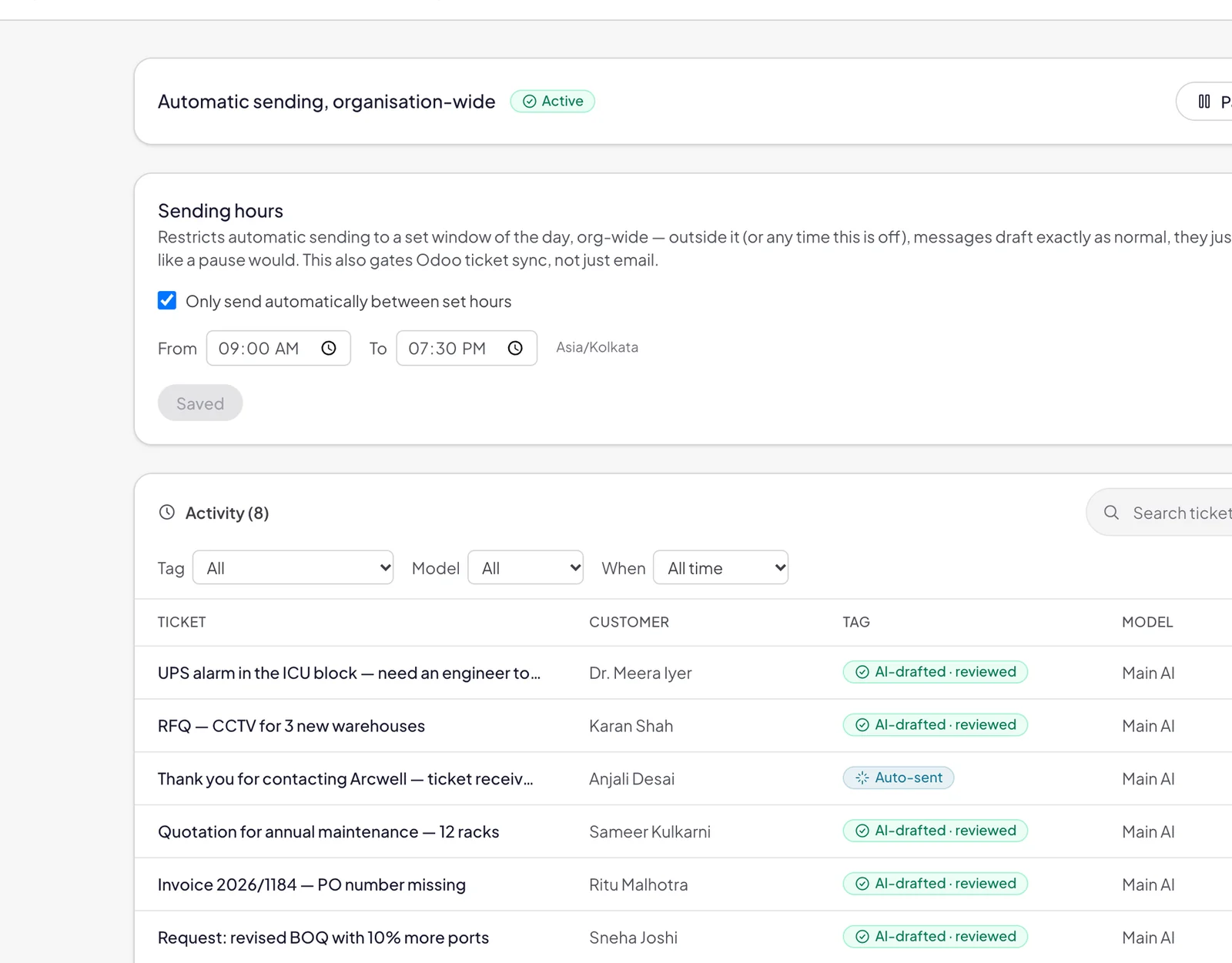
Every AI action is logged with the model that handled it. One switch pauses automatic sending everywhere, or for a single mailbox.

  • Review before send, on every reply
  • Sending hours, ignored senders and your own tone
  • A backup AI model steps in if the main one is busy
AI activity log showing each AI-drafted reply, the model that handled it and a pause-everywhere switch
And everything around it

Built for how your team already works.

Microsoft 365

Runs on your existing mailboxes, with no migration.

Forward anything

Colleagues and mailboxes suggested as you type.

Odoo helpdesk

Tickets open and close in Odoo automatically.

Outlook auto-close

Reply in Outlook and the ticket closes itself.

Phone app

Installs on any phone, with alerts that matter.

Wins

Points and leaderboards that build the habit.

Morning digest

What's waiting, every working morning.

Roles and access

Admins choose who uses each mailbox.

Getting started

Live in days, not months.

  1. 01

    Connect your mailboxes

    We connect your Microsoft 365 mailboxes through Microsoft's official API. Your team keeps using Outlook as usual.

  2. 02

    Set owners and rules

    Choose who owns each mailbox, the deadlines, the alert chain and the writing style the AI should use.

  3. 03

    Go live

    From the first email, the AI sorts and drafts. Brevity sets it up with you and tunes it on your real mail.

  • Microsoft's official API
  • Attachments are never stored
  • Every AI action is logged
Book a demo

See it on your own inbox.

See Brevity Mail AI working on your own inbox, with your own email. Tell us a little about your team, or pick a time straight away.

Prefer to pick a time?

Book a demo call on our calendar, or write to [email protected].

How many mailboxes does your team use?
Is your email on Microsoft 365?
FAQ

Questions about Brevity Mail AI

Still have a question?

Ask us directly. You’ll talk to the people doing the work.

What is Brevity Mail AI?

An AI inbox for teams that run on email. It works on top of the Microsoft 365 mailboxes you already use. Every email is read, sorted and turned into a ticket with an owner, a priority and a deadline, and AI drafts the reply.

Does it send emails on its own?

Replies are drafted by AI and sent by a person. Nothing goes out until someone presses Send. You can switch on instant acknowledgements, which only go out in your working hours, and one switch pauses automatic sending everywhere or for a single mailbox.

Do we need to move off Outlook?

No. Brevity Mail AI runs on your existing Microsoft 365 mailboxes with no migration, and your team keeps using Outlook. If someone replies from Outlook, the ticket closes itself.

Which email systems does it work with?

Microsoft 365 mailboxes, connected through Microsoft's official API.

What happens to emails that don't need a reply?

They're filed away for you, not deleted. In our first production deployment, 76% of the 31,000+ emails handled needed no reply and were filed automatically.
What if a reply is late?

The ticket climbs an alert chain you set for each mailbox, for example a backup engineer after 30 minutes, the team lead after an hour and the head of operations after two, with a phone alert at every step.

Does it work with Odoo?

Yes. Tickets open and close in the Odoo helpdesk automatically.

How is our data handled?

Mailboxes connect through Microsoft's official API, attachments are never stored, and every AI action is logged with the model that handled it. Files you give the Email Writer for context are never sent.

How long does setup take?

Days, not months. We connect your mailboxes, you choose owners, deadlines, the alert chain and the writing style, and it goes live. Brevity sets it up with you and tunes it on your real mail.

How much does it cost?

Book a demo and we'll share pricing for your team, after seeing Brevity Mail AI work on your own inbox.

Every email deserves an answer.

See Brevity Mail AI working on your own inbox, with your own email.